AP Ration Card Download Process 2026 – Step-by-Step Guide
Downloading an AP Ration Card (Rice Card) has become easier through the digital services provided by the Government of Andhra Pradesh. Depending on your requirement, you may be able to access your card through official online platforms or obtain a printed copy from your local Village or Ward Secretariat.
This guide explains the commonly used methods, important requirements, and key points to help you understand the download process. Since online services may change over time, always verify the latest instructions through the respective official government portal.
Ways to Download an AP Ration Card
Citizens may be able to obtain a digital or printed copy of their AP Ration Card using one of the officially available service channels.
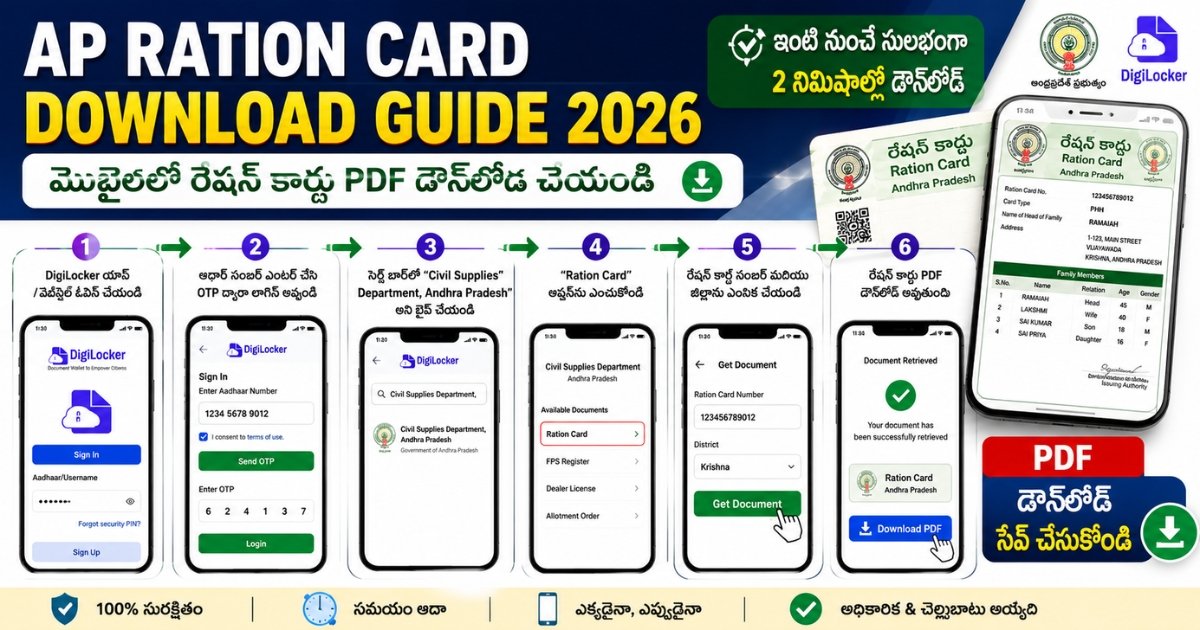
Download Through DigiLocker
DigiLocker allows eligible users to access government-issued digital documents in one place. If your AP Ration Card is available through DigiLocker, you can sign in using your Aadhaar-linked mobile number and search for the appropriate document issued by the concerned department.
Once the required details are verified, the document can be added to your DigiLocker account for future access.
Download Through the AP AePDS Portal
The AP AePDS portal provides access to various beneficiary-related services. Depending on the services currently available, users may be able to view their ration card details, beneficiary information, family records, and verification status.
Applicants should enter the required identification details carefully and verify the displayed information before saving or printing the document.Visit the Village or Ward Secretariat
If you are unable to access online services or experience technical issues, you can visit your nearest Village or Ward Secretariat.
The concerned officials can verify your beneficiary information and, wherever applicable, assist you in obtaining a printed copy of your AP Ration Card.
Important Information Before Downloading
Before attempting to download your AP Ration Card, it is advisable to ensure that the beneficiary details are accurate and up to date.
Important Points
| Requirement | Details |
|---|---|
| Aadhaar Verification | Complete Aadhaar verification wherever required. |
| Mobile Number | Keep your registered mobile number active for OTP verification. |
| Family Details | Ensure beneficiary information is correct before downloading. |
| Internet Connection | Use a secure internet connection while accessing official portals. |
| Official Sources | Download documents only from official government websites. |
What to Do If You Cannot Download Your Card
If the AP Ration Card is not available online or an error occurs during the process, applicants may consider the following:
- Verify that the entered details are correct.
- Check whether Aadhaar verification has been completed.
- Confirm that the beneficiary information has been updated.
- Visit the nearest Village or Ward Secretariat for further assistance.
- Refer to the official government portal for service updates.
Conclusion
Downloading an AP Ration Card is generally a simple process when the beneficiary information is verified and the required details are available. Whether you use DigiLocker, the AP AePDS portal, or your local Secretariat, always rely on official government resources to access the latest services and information.
Latests Updates – AP Ration Card Download process



Official Andhra Pradesh Ration Card & AePDS Links
ఆంధ్రప్రదేశ్ రేషన్ కార్డ్, AePDS మరియు Civil Supplies సంబంధిత అధికారిక సేవల కోసం క్రింది ప్రభుత్వ వెబ్సైట్లను సందర్శించండి.
AP Ration Card Download process – Frequently Asked Questions (FAQs)
Can I download my AP Rice Card using only my Aadhaar number?
Yes. You can use your Aadhaar number to first find your Rice Card ID on the AePDS portal under the “RC Details” section. Once you have the ID, you can download the official digital certificate through the DigiLocker app or website by authenticating with your Aadhaar-linked mobile number.
Can I download my AP Ration Card online?
Yes. If online services are unavailable or additional assistance is required, citizens may contact their nearest Village or Ward Secretariat for guidance.
Is Aadhaar required to download the AP Ration Card?
Certain online services may require Aadhaar-based verification or other beneficiary identification details. Requirements may vary depending on the service being used.
Can I get a printed copy from the Secretariat?
Yes. If online services are unavailable or additional assistance is required, citizens may contact their nearest Village or Ward Secretariat for guidance.
Is the digital AP Ration Card valid?
Digital documents issued through officially recognized government platforms may be accepted for applicable government services. Users should always verify the latest guidelines issued by the concerned authorities.
How do I download the Rice Card if I don’t have a smartphone?
If you don’t have a smartphone, you can visit your Village/Ward Secretariat and ask the Digital Assistant. They can access the government database, download your digital card, and provide you with a printed copy for a small stationery fee.
ఏపీ కొత్త రేషన్ కార్డ్ డౌన్లోడ్ 2026: ఆన్లైన్లో పొందే విధానం (Step-by-Step)
ఆంధ్రప్రదేశ్లో 2026 నాటికి రేషన్ కార్డు (రైస్ కార్డ్) డౌన్లోడ్ చేసుకునే విధానం మరింత సులభతరం చేయబడింది. మీరు మీ మొబైల్లోనే అధికారిక డిజిటల్ కాపీని పొందవచ్చు.
ఏపీ రేషన్ కార్డ్ డౌన్లోడ్ చేసే పద్ధతులు
పద్ధతి 1: డిజిలాకర్ (DigiLocker) ద్వారా – అధికారిక పద్ధతి
ప్రభుత్వ నిబంధనల ప్రకారం డిజిలాకర్లో ఉన్న రేషన్ కార్డ్ అన్ని రకాల అవసరాలకు చెల్లుబాటు అవుతుంది.
- లాగిన్ అవ్వండి: DigiLocker వెబ్సైట్ లేదా యాప్లో మీ ఆధార్ నంబర్ మరియు OTPతో లాగిన్ అవ్వండి.
- సెర్చ్ చేయండి: “Search Documents” లోకి వెళ్లి “Food and Civil Supplies Department, Andhra Pradesh” అని టైప్ చేయండి.
- కార్డు ఎంచుకోండి: అందులో ఉన్న “Ration Card” ఆప్షన్ను ఎంచుకోండి.
- వివరాలు ఇవ్వండి: మీ రైస్ కార్డ్ నంబర్ మరియు జిల్లా పేరు ఎంటర్ చేయండి.
- డౌన్లోడ్: “Get Document” పై క్లిక్ చేయగానే మీ కార్డు PDF రూపంలో వస్తుంది. దీనిని మీరు ఎప్పుడైనా ప్రింట్ తీసుకోవచ్చు.
పద్ధతి 2: AePDS పోర్టల్ ద్వారా (వివరాల వెరిఫికేషన్)
మీ కార్డు స్టేటస్ మరియు కుటుంబ సభ్యుల వివరాలను చూడటానికి ఇది ఉపయోగపడుతుంది.
- వెబ్సైట్: AePDS AP వెబ్సైట్ సందర్శించండి.
- RC Details: మెనూలో “RC Details” పై క్లిక్ చేయండి.
- సెర్చ్: మీ రైస్ కార్డ్ నంబర్ లేదా ఆధార్ నంబర్ ఎంటర్ చేసి సబ్మిట్ చేయండి.
- ఇక్కడ మీ కార్డు వివరాలు కనిపిస్తాయి, వీటిని స్క్రీన్ షాట్ లేదా ప్రింట్ తీసుకోవచ్చు.
పద్ధతి 3: స్మార్ట్ రేషన్ కార్డులు (Smart Cards)
2026 నుండి ఏపీ ప్రభుత్వం కొత్తగా ఏటీఎం తరహాలో ఉండే స్మార్ట్ రేషన్ కార్డులను పంపిణీ చేస్తోంది.
- మీరు ఇప్పటికే ఉన్న కార్డును స్మార్ట్ కార్డుగా మార్చుకోవడానికి మీ దగ్గరలోని గ్రామ/వార్డు సచివాలయాన్ని సంప్రదించవచ్చు.
- సచివాలయం డిజిటల్ అసిస్టెంట్ మీ వివరాలను వెరిఫై చేసి, కొత్త స్మార్ట్ కార్డును అందజేస్తారు.
WhatsApp Share Caption
🌾 మీ ఏపీ రేషన్ కార్డును మొబైల్లోనే డౌన్లోడ్ చేసుకోండి! 💳
2026 కొత్త నిబంధనల ప్రకారం డిజిటల్ రైస్ కార్డ్ మరియు స్మార్ట్ కార్డును ఎలా పొందాలో పూర్తి వివరాలు ఇక్కడ ఉన్నాయి: 👇
✅ డిజిలాకర్ ద్వారా PDF డౌన్లోడ్ ✅ ఆధార్తో కార్డు స్టేటస్ చెక్ ✅ కొత్త స్మార్ట్ కార్డు పొందే విధానం
పూర్తి గైడ్ కోసం ఇక్కడ క్లిక్ చేయండి: 👉 https://aepdsap.com/ap-ration-card-download-process-telugu/
📌 గమనిక: రేషన్ సరుకులు పొందేందుకు కుటుంబ సభ్యులందరికీ e-KYC తప్పనిసరి. వివరాల కోసం మీ వాలంటీర్ను సంప్రదించండి.

Tags: AP Ration Card Download 2026, Download AP Rice Card PDF, Digital Ration Card AP, DigiLocker AP Ration Card, Download Rice Card by Aadhaar Number, AePDS Rice Card Download, AP Food Security Card Download, e-Ration Card AP, AP Rice Card Print Online, Secretariat Rice Card Download, MeeSeva Ration Card Download, AP Govt Digital Cards 2026, ఏపీ రేషన్ కార్డ్ డౌన్లోడ్ 2026, రైస్ కార్డ్ పీడీఎఫ్ డౌన్లోడ్, ఆన్లైన్ రేషన్ కార్డ్ ప్రింట్.
AP Ration Card Download process, AP Ration Card Download process, AP Ration Card Download process, AP Ration Card Download process